

10 AI Features Mobile Apps Will Need in 2026 (Or Users Will Quit — With Examples & When to Build Them)
AI Features Mobile Apps 2026: Why Expectations in the USA Have Changed
Mobile app users in 2026 are far less forgiving than they were even a few years ago. Every new app they install is unconsciously compared to the best products they already use daily—Netflix, Amazon, Spotify, Google Maps, Apple Pay. Smooth navigation and fast load times are now assumed. What actually determines whether users stay is whether an app feels intelligent.
This is why AI features in mobile apps in 2026 are no longer speculative. In the USA market, users spend more than four hours per day inside mobile apps, but that time is concentrated in apps that feel personal, responsive, and helpful. Apps that feel manual, repetitive, or generic are quickly abandoned.
AI adoption has also moved beyond experimentation. Artificial intelligence is now widely used across industries, not just by large technology companies. Startups and mid-sized teams increasingly rely on existing AI SDKs, mobile frameworks, and APIs to add intelligence to their products. As a result, Artificial Intelligence features in mobile app development are becoming a baseline requirement rather than a differentiator.
For founders and product owners, the real challenge is prioritization. Adding every possible AI feature too early creates complexity and cost without clear returns. Ignoring AI entirely makes an app feel obsolete. The goal is to understand which AI mobile app features list truly matter, how they improve user experience, and when they should be introduced.
In the United States, mobile apps are deeply embedded in daily life. Around 80% of the U.S. population owns a smartphone, and mobile usage continues to grow, driven by productivity, social, and commerce apps. Americans spend significant portions of their day inside mobile apps, creating high expectations for intelligent and adaptive user experiences—a trend that shapes AI mobile app trends in the USA and sets a baseline that many founders overlook when planning new features.
A recent nationwide survey found that 57% of Americans use AI for personal purposes, and 40% report increased use of AI over the past year, reflecting widespread comfort with intelligent features on mobile devices. This supports the idea that AI integration features in mobile apps are expected by users, not just appreciated.
This guide breaks down the top AI features for mobile apps in 2026, with a strong focus on the USA market. Each feature includes a clear explanation, real-world examples, business and UX impact, trade-offs, and guidance on timing. The discussion applies to intelligent systems for Android, iOS, and cross-platform apps. In addition to the 10 core AI features users experience directly, this guide also covers platform-level and development considerations that impact how these features perform in real-world mobile apps.
Why Expectations Are Higher, Specifically in the USA
User expectations around AI-powered mobile app features are especially high in the United States. According to Pew Research data, the majority of U.S. smartphone users now rely on AI-driven features daily, often without consciously noticing them. Voice assistants, biometric authentication, predictive navigation, and personalized recommendations are already embedded in everyday usage.
Statista reports that U.S. users spend more time per day on mobile apps than users in most other markets, with usage heavily concentrated in apps that feel personalized and efficient. This has created a competitive environment where users do not tolerate friction. If an app requires repeated manual input, fails to remember preferences, or does not adapt over time, it is quickly replaced.
From a product standpoint, this means that AI mobile app trends in the USA are not driven by novelty but by expectation. Features like AI personalization, predictive analytics, and intelligent automation are no longer perceived as innovations. They are perceived as competent.
AI Adoption and Mobile App Usage Trends (2016–2026)
Two long-term trends explain why AI-powered mobile app features are now expected. First, mobile usage has increased steadily since 2016. Second, AI adoption in consumer apps accelerated sharply after 2020.
Market research shows this app sector is rapidly expanding, with thousands of apps integrating intelligent models to serve personalized, generative, and predictive functions, and major platforms reporting strong adoption across categories such as search, assistant apps, and creative tools
Public data from organizations like Gartner and Statista shows that Artificial Intelligence is now embedded across personalization, recommendations, fraud detection, voice interaction, and analytics. Gartner has projected that a large portion of applications will include AI-driven agents by 2026, while Statista reports continued growth in mobile usage time per user in the United States.
Empirical research indicates that AI techniques in mobile applications, such as on-device machine learning and natural language processing, are widely adopted and play a key role in features ranging from image recognition to personalized recommendations, highlighting the depth of mobile AI integration.
While artificial intelligence existed long before 2016, its use in consumer mobile apps was limited during that period. Between 2016 and 2019, AI in mobile apps was mostly confined to basic personalization and analytics. Widespread AI-powered mobile app features only accelerated after improvements in mobile hardware, cloud AI services, and on-device processing.
The shift toward AI-powered mobile app features did not happen overnight. Two parallel trends explain why users in the USA now expect intelligence as a baseline: the steady rise in mobile app usage and the rapid acceleration of intelligent features integration in consumer applications.
The chart below compares the growth of AI integration in consumer apps with average daily mobile app usage per user in the United States between 2016 and 2026.
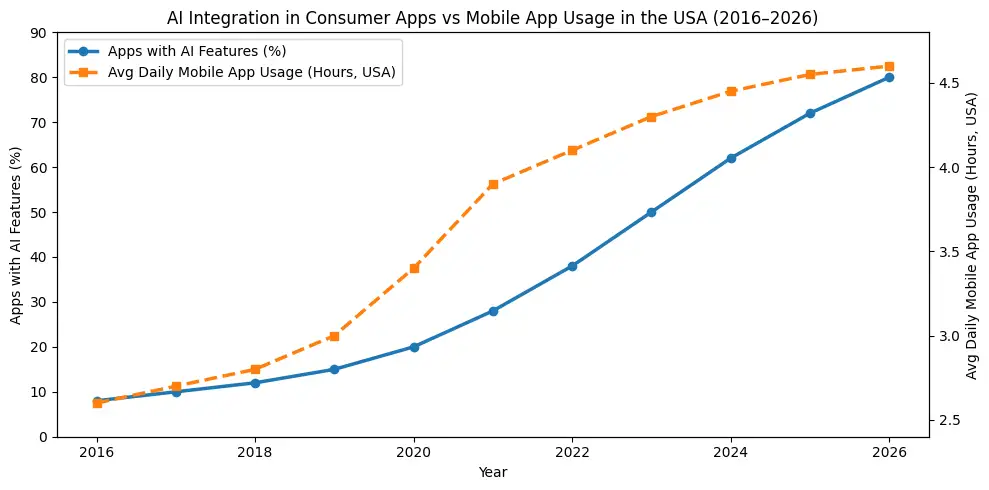
Growth of artificial intelligence integration in consumer mobile apps vs
average daily mobile app usage per user in the USA (2016–2026).
These trends explain why users rarely think about “AI features” anymore. They simply expect apps to adapt, predict, and respond. If an app cannot do this, it feels behind.
Analyst firm Gartner notes that up to 40% of enterprise applications will include task-specific AI agents by 2026, growing from under 5% today—highlighting how rapidly intelligent automation and adaptive behavior are being planned into software roadmaps.
1. AI-Powered Personalization & Recommendations
What it is
AI-powered personalization adapts the app experience to individual users based on behavior, preferences, and context. This includes AI personalization mobile apps, hyper-personalization apps, user behavior personalization, and recommendation engine mobile systems. Instead of a one-size-fits-all experience, the app continuously adjusts what users see and how they interact.
Real-world example
Netflix customizes content order and thumbnails. Spotify updates playlists based on listening habits. Amazon adjusts product feeds using AI content recommendations derived from browsing and purchase history.
Why it matters
Personalization is one of the most essential AI features mobile apps can offer. It increases engagement, session length, and conversion rates. Users feel understood, which directly improves retention and loyalty.
Trade-offs
Effective personalization depends on data. Early-stage apps must begin with simple logic and evolve gradually. Transparency around data usage is critical to avoid trust issues.
When to build
Basic personalization should exist early. Advanced recommendation systems work best once meaningful usage data is available.
AI Feature Prioritization by App Stage (2026)
Not every app should build every AI feature at once. Not every mobile app should introduce advanced artificial intelligence features at launch. One of the most common mistakes startups make is adding advanced AI before user behavior data exists. The table below outlines a practical AI features adoption timeline for 2026 based on real-world product maturity. The overview below shows how AI features in mobile apps should evolve from MVP to mature product, based on real-world usage patterns in the U.S. market.
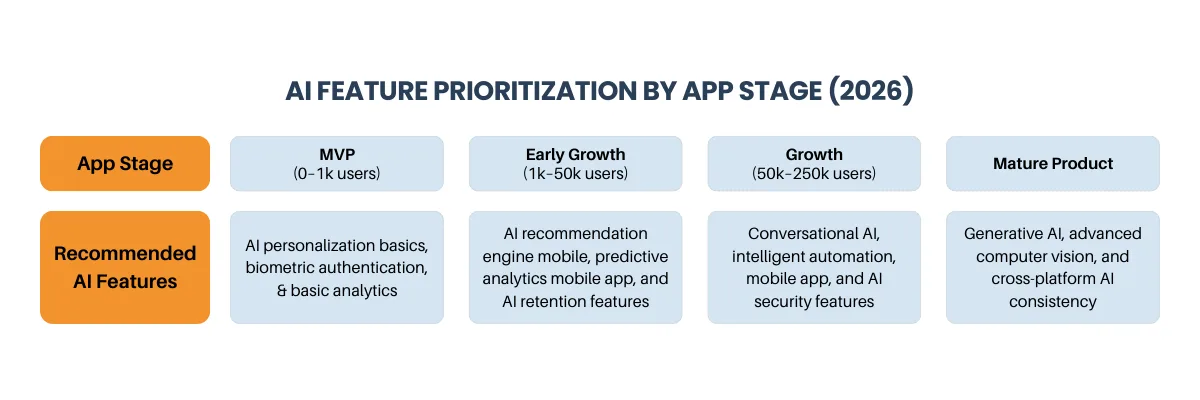
As mobile products evolve, the role of artificial intelligence changes. Early-stage apps benefit most from basic personalization and trust features, while growth-stage products rely on predictive analytics, intelligent automation, and conversational interfaces to reduce friction.
This staged approach helps founders decide which AI features in mobile apps to build first, avoid premature complexity, and align development effort with real user behavior, especially in competitive U.S. markets.
This roadmap helps founders decide which automated intelligence features for startup apps actually deliver value at each stage.
Many early-stage teams rush advanced AI features before validating workflows, a pattern commonly seen in Android-first startups and discussed in Top 10 Mistakes Startups Make When Developing Their Android App.
AI Features Mobile Apps 2026 – Summary Overview
For founders searching for AI features in mobile apps 2026, the key is not volume—but prioritization. The table below summarizes the top AI features for mobile apps, when they should be built, and the primary business value they deliver across U.S. consumer markets.
| AI Feature | Primary Benefit | Best-Fit App Types | When to Implement |
|---|---|---|---|
| AI personalization mobile app | Higher engagement & relevance | E-commerce, media, SaaS | Early growth |
| AI recommendation engine mobile | Content & product discovery | Streaming, retail | Growth stage |
| Conversational AI mobile apps | Lower support friction | Fintech, travel | Post-MVP |
| Predictive analytics mobile app | Retention forecasting | Fitness, subscriptions | Growth stage |
| AI computer vision mobile apps | Camera-driven interaction | Retail, finance | Feature-led apps |
| On-device AI mobile apps | Speed, privacy, offline access | Health, security | Any stage |
This overview reflects how AI mobile app features are adopted in real-world U.S. products—not theoretical roadmaps.
2. Conversational AI & Voice Interfaces
What it is
Conversational AI allows users to interact with apps using natural language. This includes conversational mobile apps, chatbots for mobile apps, natural language processing apps, voice recognition mobile apps, and virtual assistant features.
Real-world example
Banking apps handle balance checks and transfers through chat. E-commerce apps answer order questions conversationally. Voice assistants enable hands-free actions inside productivity and travel apps.
Why it matters
Conversational interfaces reduce friction and improve accessibility. They also reduce support workload while improving user satisfaction.
Trade-offs
Poorly designed chatbots frustrate users. Clear scope and human fallback options are essential.
When to build
Text-based support chat can be added early. Voice interfaces usually follow once core workflows are stable.
3. Predictive Analytics & User Behavior Forecasting
What it is
Predictive analytics uses historical and real-time data to anticipate future actions. This includes predictive analytics mobile app, predictive insights app, forecasting mobile apps, behavior analysis app, and analytics feature for apps.
Real-world example
Google Maps predicts destinations. Fitness apps suggest recovery days. E-commerce apps predict replenishment needs.
Why it matters
Prediction removes friction and enables proactive UX. These are intelligent features that increase retention and support smarter engagement decisions.
Trade-offs
Incorrect predictions can irritate users if surfaced too aggressively.
When to build
Introduce predictive features after consistent behavior patterns emerge.
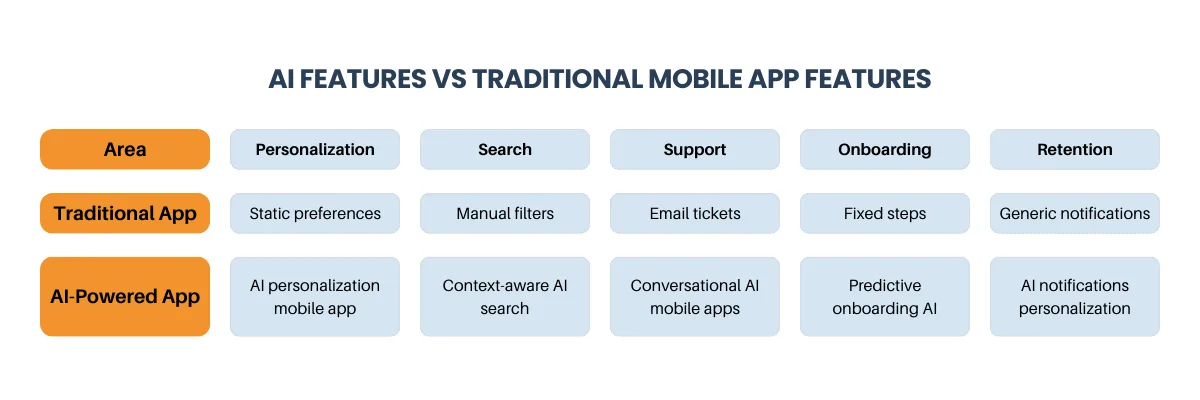
This comparison highlights why many founders now ask should mobile app include AI features early rather than treating Artificial Intelligence as an add-on.
4. Computer Vision & AR Features
What it is
Computer vision enables apps to interpret images and video. This includes computer vision mobile apps, image recognition mobile apps, object detection apps, photo analysis features, and Augmented Reality mobile app capabilities.
Real-world example
Retail apps offer AR try-ons. Finance apps scan documents. E-commerce platforms support visual search.
Why it matters
Computer vision turns the camera into a smart input and differentiates mobile apps from web products. This advantage is discussed in Mobile App or Web App? How Startups Decide in 2025.
Trade-offs
Battery usage and device variation must be carefully managed.
When to build
If visual interaction is core, build early. Otherwise, add as a growth feature.
5. Edge AI & On-Device Processing
What it is
Edge AI processes data directly on the device. This includes on-device mobile apps, edge AI features, offline mobile features, an AI NPU mobile app, and edge computing apps.
Real-world example
Face ID authentication, offline voice recognition, and on-device photo categorization.
Why it matters
On-device processing improves speed, offline reliability, and privacy, supporting machine-learning models and their privacy protection apps.
Trade-offs
Older devices may have limited processing capacity.
When to build
Prioritize edge AI for sensitive data and real-time interaction.
Cost planning becomes especially important for AI features such as on-device processing and predictive analytics, which must align with realistic budgets as outlined in Mobile App Development Cost in USA (2025).
AI-Powered Security, Authentication & Fraud Detection
What it is
AI security detects abnormal behavior and protects users. This includes mobile security features, fraud detection mobile, biometric authentication app, and secure mobile app capabilities.
Real-world example
Banking apps flag suspicious transactions and use biometric login.
Why it matters
Trust is fundamental. Security AI reduces fraud, abuse, and user churn.
Trade-offs
False positives require careful tuning and review paths.
When to build
Mandatory from day one for fintech, healthcare, and marketplaces.
7. Intelligent Automation & Workflow Optimization
What it is
Intelligent automation reduces repetitive user actions. This includes an intelligent automation mobile app, a workflow automation app, an adaptive app UI, and context-aware apps.
Real-world example
Expense apps auto-categorize spending. Productivity apps reorder tasks. Support tools route tickets using automated AI ticketing app logic.
Why it matters
Automation saves time and improves satisfaction. These are intelligence-driven features that save user time and support retention.
Trade-offs
Too much automation without clarity can confuse users.
When to build
Add once core workflows are well understood.
8. Generative AI for Content & Creativity
What it is
Generative AI creates text, images, and plans. These AI-powered mobile app features are common in writing, design, education, and fitness apps.
Real-world example
AI writing assistants, image generation tools, and personalized fitness plans.
Why it matters
Generative features increase engagement and reduce effort, supporting intelligent features that boost user engagement.
Trade-offs
Generated output may require review and usage limits.
When to build
Introduce when content creation is a clear user need.
9. AI-Powered Content Moderation & Quality Control
What it is
AI moderation detects spam and abuse. This includes an AI threat detection app and quality scoring systems.
Real-world example
Social apps filter harassment. Marketplaces remove fake listings.
Why it matters
Moderation protects trust and reduces churn.
Trade-offs
False positives require appeal mechanisms.
When to build
Immediately, if user-generated content exists.
10. AI Retention & Engagement Optimization
What it is
Retention-focused AI analyzes usage patterns. This includes retention features, mobile engagement optimization, and notifications personalization.
Real-world example
Smart push notifications triggered by behavior instead of fixed schedules.
Why it matters
These are AI features that improve retention and increase lifetime value.
Trade-offs
Poor targeting leads to notification fatigue.
When to build
Add once engagement data is stable.
Industry Examples: How AI Mobile App Features Are Used in the USA
- E-commerce apps use AI recommendations for mobile e-commerce to increase repeat purchases
- Fitness apps rely on predictive analytics to adjust training intensity and prevent churn
- Healthcare apps apply on-device intelligence for privacy-sensitive monitoring
- Fintech apps depend on AI fraud detection and biometric authentication
- Travel apps use conversational assistants and predictive alerts to reduce friction
AI Development for Mobile Apps in the USA
From Strategy to Execution, We Help Startups Add the Right AI Features Without Overbuilding.
11. Cross-Platform AI Consistency
What it is
Ensures AI behavior is consistent across features for Android apps, iOS apps, and cross-platform apps.
Real-world example
A recommendation engine behaving the same across mobile and tablet devices.
Why it matters
Consistency builds trust and avoids fragmented UX.
Trade-offs
Requires careful model and data sharing decisions.
When to build
Plan early if multiple platforms are supported.
Modern AI features behave differently across platforms, and strong apps account for this.
On iOS, teams commonly rely on Core ML, Vision, and Siri Shortcuts to deliver on-device intelligence. These tools support intelligent features for iOS apps such as biometric authentication, offline predictions, and image recognition.
On Android, ML Kit, TensorFlow Lite, and on-device neural processing enable AI features for Android apps, including real-time camera analysis, smart text recognition, and adaptive UI behavior.
Cross-platform teams must design AI models and data pipelines that deliver consistent outcomes while respecting platform-level differences. This is a core challenge in AI mobile app architecture 2026.
12. AI Development, Testing & Quality Assurance
What it is
AI supports delivery through mobile app development tools, testing mobile apps, quality assurance mobile, and DevOps mobile apps.
Real-world example
AI-generated test cases and automated bug detection.
Why it matters
Improves release quality and stability.
Trade-offs
Human review remains essential.
When to build
Useful throughout the development lifecycle.
As AI development becomes more specialized, teams often reassess whether to build internally or work with external experts, a decision explored in In-House vs Agency vs Freelancers.
AI Features You Should Not Build First
Not every AI feature belongs in an early roadmap. Many apps fail by adding complex AI before validating core user needs. Common examples include advanced generative AI without usage data, over-engineered prediction models, or automation that replaces workflows users have not yet adopted.
As discussed in When Your Startup Should Not Build a Mobile App (Yet), product decisions should follow user behavior—not assumptions. The same applies to AI. If users are not yet engaging consistently, AI will not fix that problem.
This section often separates a successful AI-driven mobile app strategy from expensive rework.
Users searching for topics such as AI features in mobile apps 2026, top AI features for mobile apps, or must-have AI features for apps are rarely looking for theory. They want practical guidance on what to build, when to build it, and how those features improve real user experiences. This guide is structured to answer that intent directly, with examples drawn from Android, iOS, and cross-platform mobile apps used daily in the United States.
Conclusion: Choosing AI Features That Actually Matter
The best AI features mobile app 2026 users expect are not flashy. They remove friction, feel natural, and respect user trust. Teams that succeed start with UX-focused features, introduce advanced intelligent systems only once data supports it, and avoid early overbuilding that adds complexity without clear value.
Industry research confirms this direction. Companies that use AI to improve customer experience consistently see stronger engagement and long-term retention than those relying on static digital flows. At the same time, AI-powered agents and intelligent workflows are becoming standard across consumer and enterprise applications by 2026.
Industry research, such as the McKinsey State of AI survey, shows that 88% of organizations report regular AI use in at least one business function, and many are now exploring advanced AI workflows. This underscores that AI is not experimental; it is part of how leaders expect digital products to deliver measurable engagement and operational impact.
Selecting the right execution model early can prevent costly rework later, especially for AI-heavy mobile apps, as discussed in Choosing the Right Mobile App Development Partner.
Planning remains critical. AI features only create value when they align with real user behavior, realistic budgets, and the right execution approach. When implemented thoughtfully, AI improves UX, retention, and trust. When implemented poorly, it adds cost without results. The difference lies in prioritization, timing, and execution.
Final Thoughts
AI features are no longer optional in mobile apps. From personalization and predictions to security and automation, the best AI features mobile apps in 2026 offer are those that reduce effort and feel natural. Start with features that improve UX, introduce advanced AI once data is available, and always prioritize user trust.
Apps that adopt the right AI integration features early will see stronger engagement, better retention, and long-term growth in the competitive USA market.
Planning AI Features for Your Mobile App?
Get Clarity on Costs, Timelines, and the Right Feature Roadmap for Your App.
AI Glossary
User expectations around AI-powered mobile app features are especially high in the United States. Voice assistants, biometric authentication, predictive navigation, and personalized recommendations are already embedded in everyday usage.
Statista reports that U.S. users spend more time per day on mobile apps than users in most other markets. This has created an environment where friction is not tolerated. If an app does not adapt, remember preferences, or improve over time, it is quickly replaced.
AI-Powered Personalization & Recommendations
- Generative AI: AI models that create new text, images, or content.
- Edge AI: AI processing performed directly on a mobile device.
- Predictive Analytics: AI that forecasts future user behavior.
- Conversational AI: AI systems that understand and respond to natural language.
- Computer Vision: AI that interprets images and video.
- AI Personalization: Tailoring app experiences using user behavior data.
Frequently Asked Questions About AI Features in Mobile Apps
Q1. Do mobile apps really need AI features in 2026?
Yes. In competitive U.S. markets, users expect personalization, predictions, and automation by default.
Q2. Which AI features improve retention the most?
AI personalization, predictive analytics, and AI notifications personalization consistently drive retention.
Q3. When should startups add AI features?
Once meaningful usage data exists and workflows are validated.
Q4. Are AI features expensive to maintain?
Costs depend on usage, architecture, and whether features run on-device or in the cloud.